v0.10 pgtui is now pgtower

The control tower for your Postgres fleet.

pgtower is a keyboard-first terminal UI for operating PostgreSQL — sessions, locks, roles, pg_hba and tuning across every server you run, in one static binary you can use over SSH.

curl -fsSL https://pgtower.dev/install | sh
Star on GitHub
  • Single static binary
  • Linux & macOS · amd64 & arm64
  • No agent, no web server
  • MIT licensed
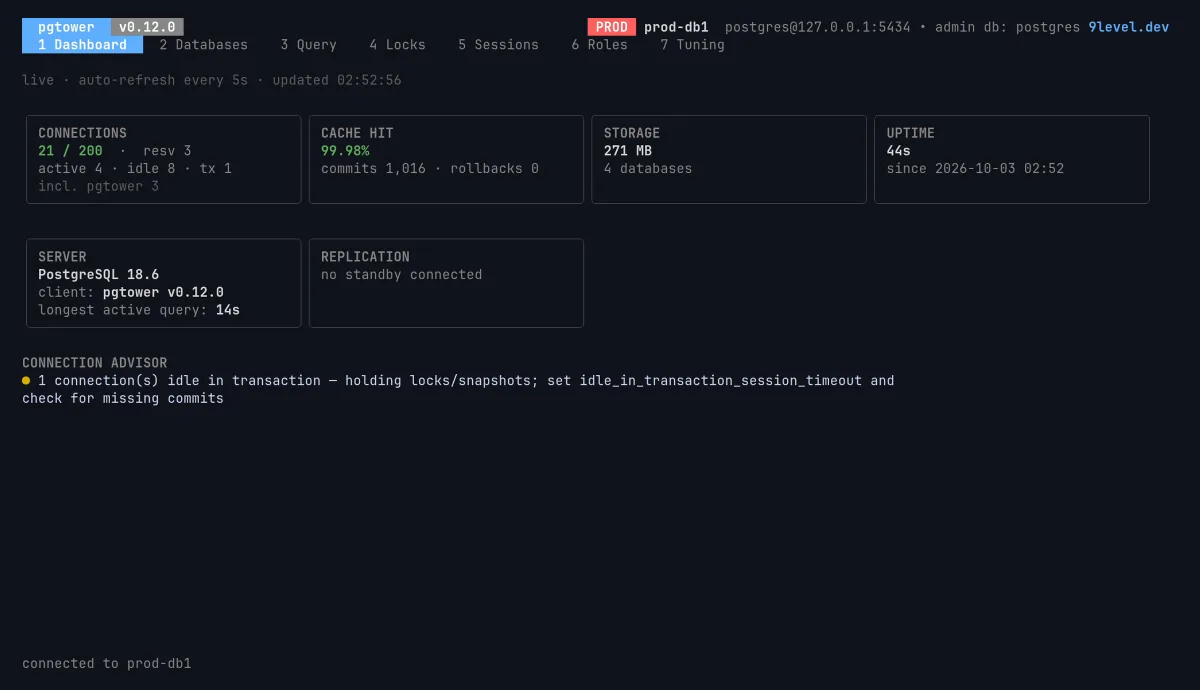
pgtower dashboard: 21 of 200 connections, 99.98% cache hit, storage, uptime, PostgreSQL 18.6, and a connection advisor warning about one idle-in-transaction session.
Dashboard. Connections against max_connections, cache hit, storage, replication and the longest query — plus an advisor that says what to fix.
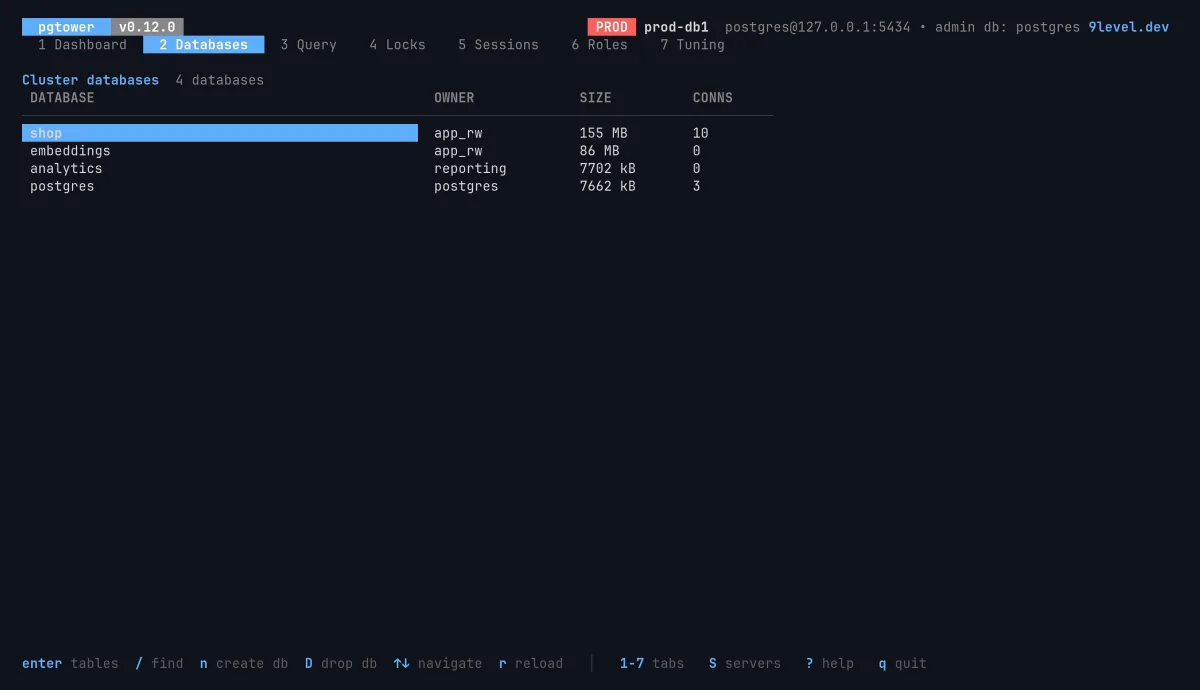
The Databases screen listing shop, embeddings, analytics and postgres with owner, size and open connections; shop is 155 MB with 10 connections.
Databases. Every database with owner, size and connections. Enter drills into its tables and a read-only data browser; dropping one asks for its name typed in full.
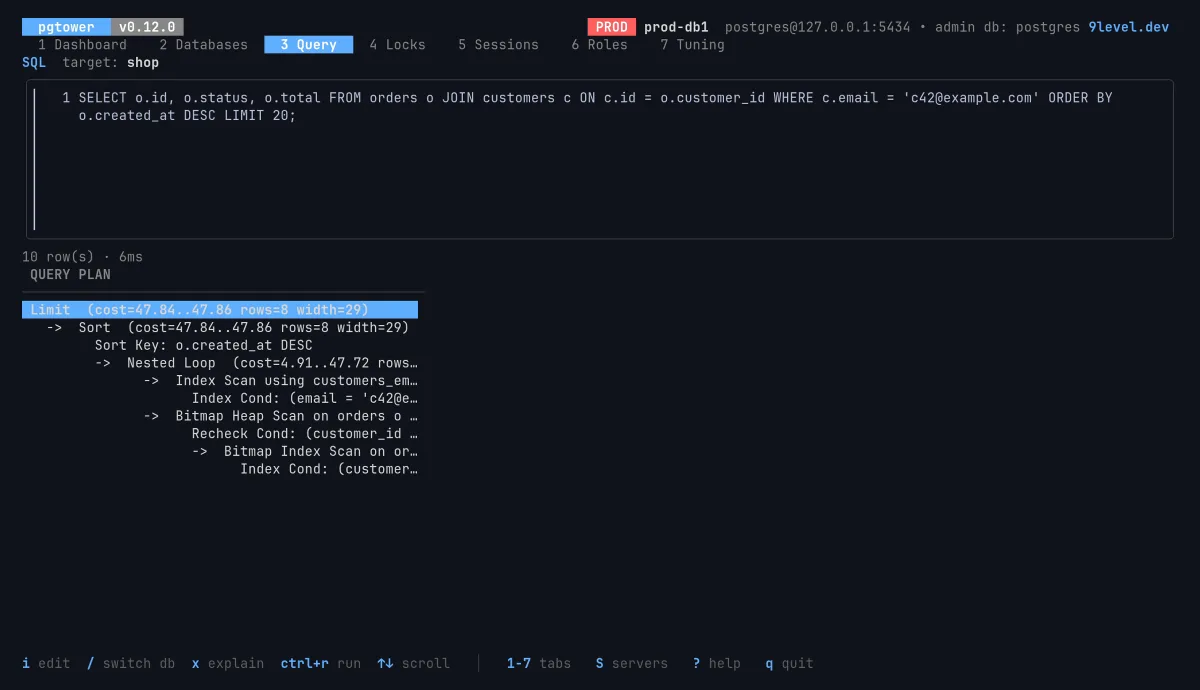
The Query screen showing an EXPLAIN plan with a nested loop, index scan and bitmap heap scan.
Query. Pick the target database, x for EXPLAIN without running it. Writes ask first; destructive statements need a typed yes.
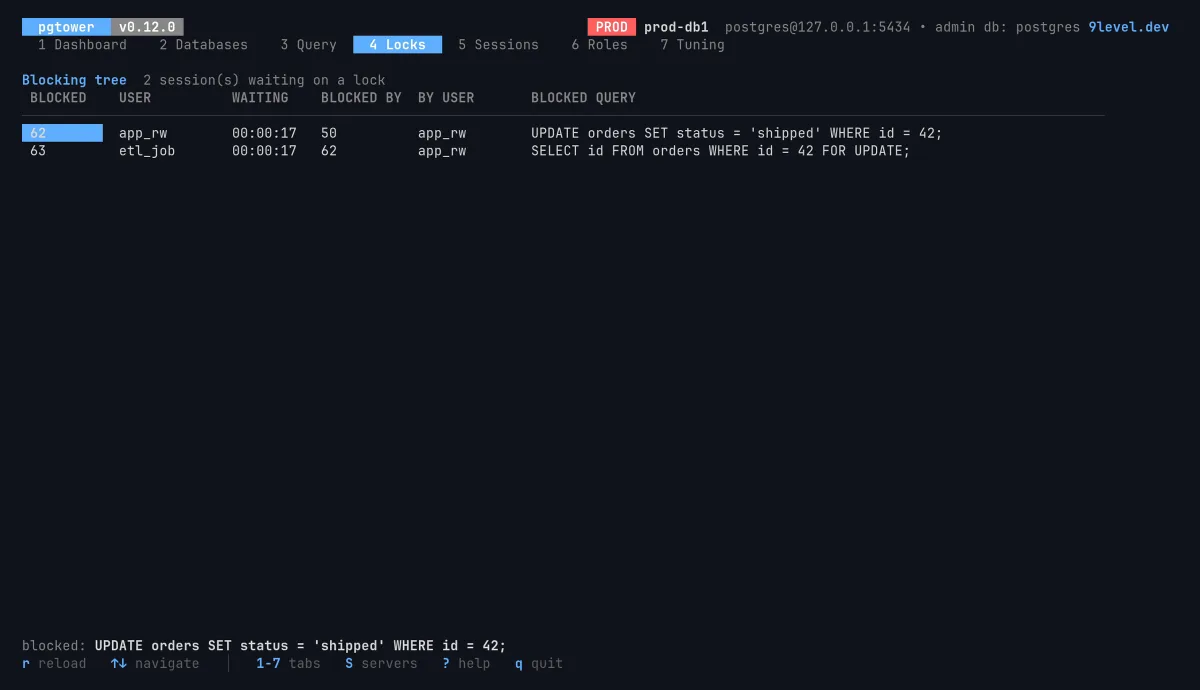
The Locks screen: a blocking tree where an ETL job and an app update both wait behind an idle-in-transaction session.
Locks. The blocking tree: who waits on whom, for how long, and the exact query that is stuck.
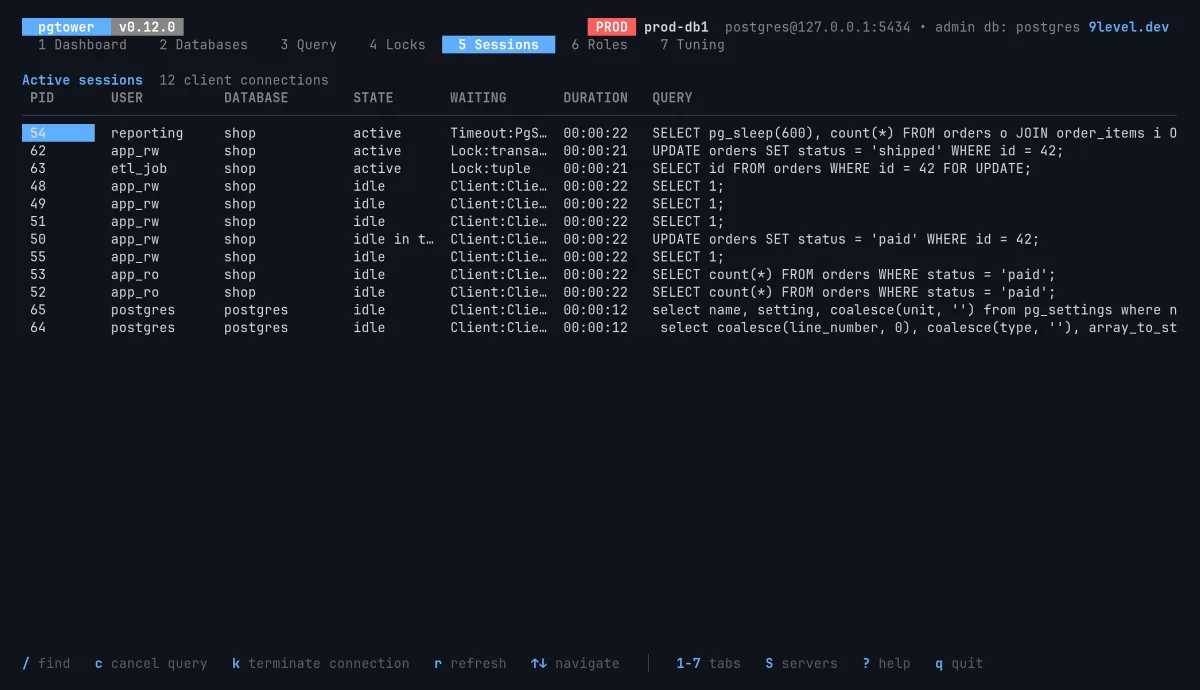
The Sessions screen: client connections with user, database, state, wait event, duration and query text.
Sessions. pg_stat_activity you can act on: c cancels a query, k terminates a connection, / finds anything.
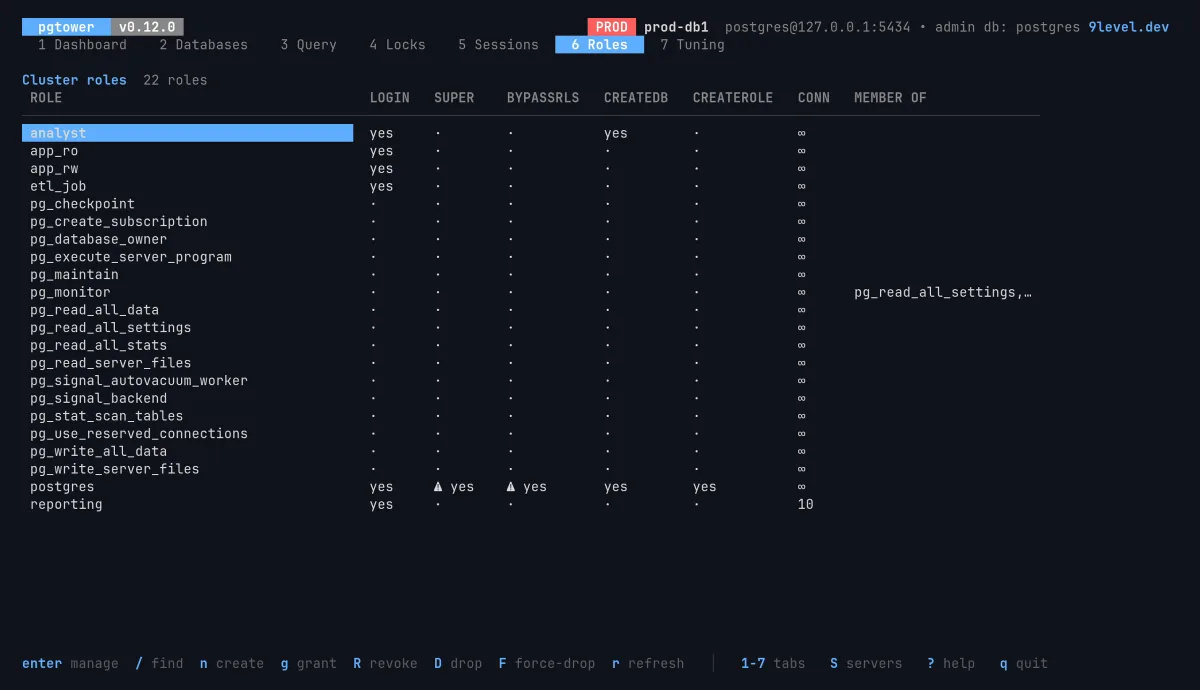
The Roles screen listing roles with LOGIN, SUPERUSER, BYPASSRLS, CREATEDB, CREATEROLE and connection limits.
Roles. Attributes at a glance, grants with the SQL shown before it runs, and a force-drop that reassigns ownership instead of losing data.
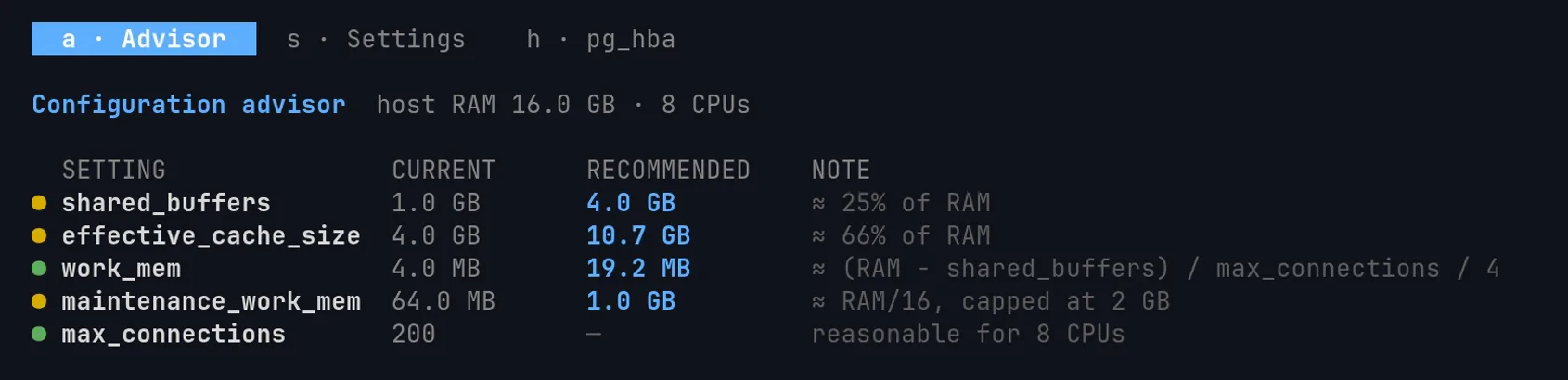
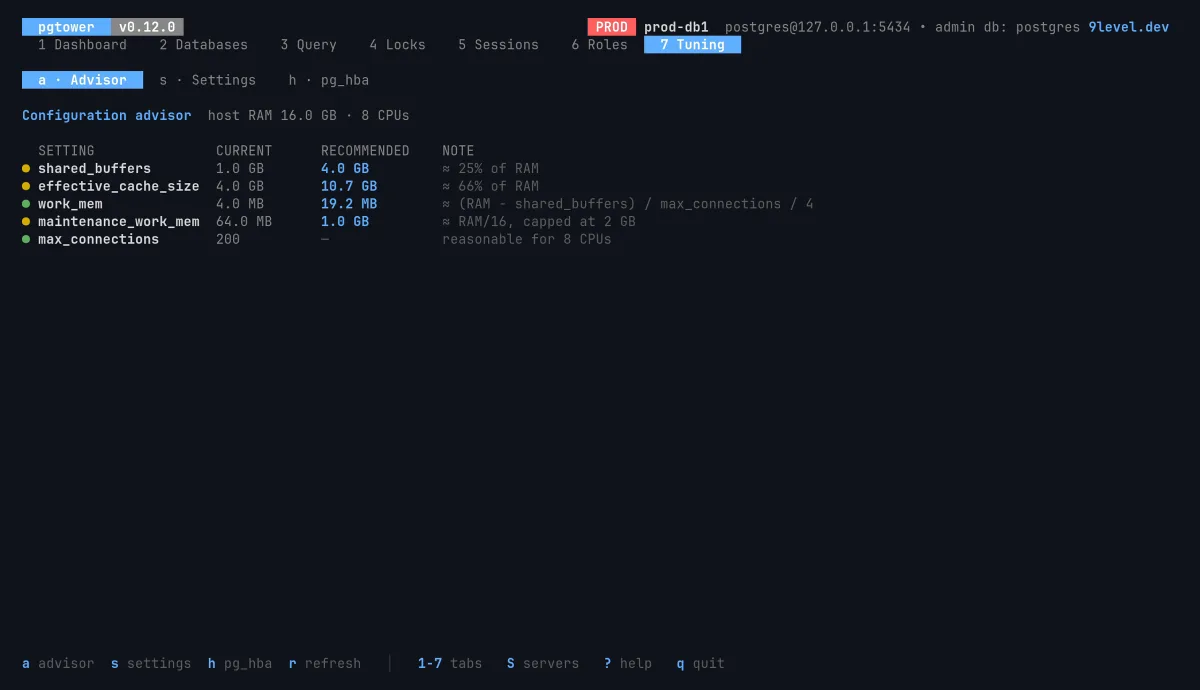
The Tuning advisor comparing shared_buffers, effective_cache_size, work_mem, maintenance_work_mem and max_connections with recommendations for the host.
Tuning. Current settings against targets for the host's RAM and CPUs, an ALTER SYSTEM editor and a pg_hba editor with automatic rollback.
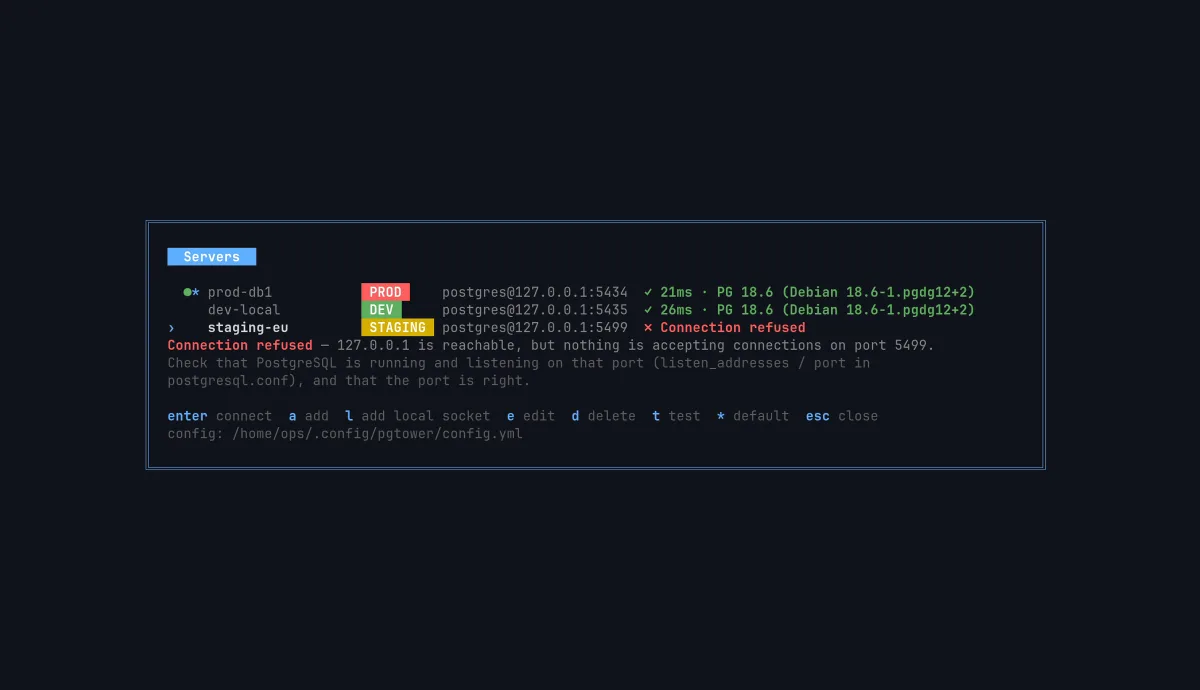
The Servers screen listing prod-db1 (PROD), dev-local (DEV) and staging-eu (STAGING); the first two answer in under 30 ms, staging-eu shows 'Connection refused' with what to check.
Servers. Every cluster in one list, tagged dev, staging or prod. Test them all, switch with S — and when one is down, read why in plain words.

Real screenshots, captured against demo clusters.

See everything

Health, sessions, locks and roles for every server — without juggling five psql windows and a wiki of queries.

Act safely

The safe path is the default one. The dangerous path asks you to type what you mean.

Zero setup

One binary. Nothing to install on the database host, no port to open, no dashboard to keep alive.

Many servers

Every cluster, one keystroke apart.

Keep production, staging and the database on your laptop in the same list. Press S, pick one, and every tab follows — nothing from the previous server can linger on screen.

  • Test all servers at once: latency and version, or the reason it failed.
  • Errors in plain language — refused, no route, pg_hba rejected — with the command to check next.
  • Unix sockets with peer login (l fills it in), ~/.pgpass and password_env: no password needs to live in the config.
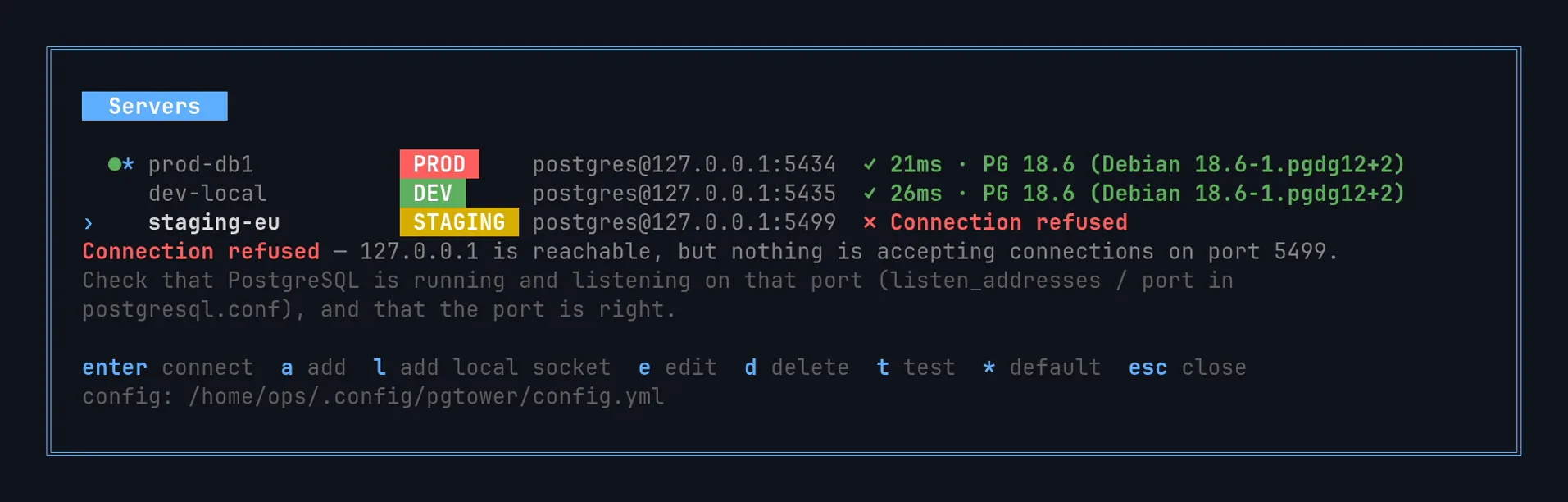
Servers screen: prod-db1 and dev-local answer in under 30 ms, staging-eu shows 'Connection refused' and what to check.

Safety model

Production looks like production.

pgtower is built for people who have typed into the wrong terminal once. Every destructive action has a deliberate second step.

  • A red PROD badge on production servers, always in view.
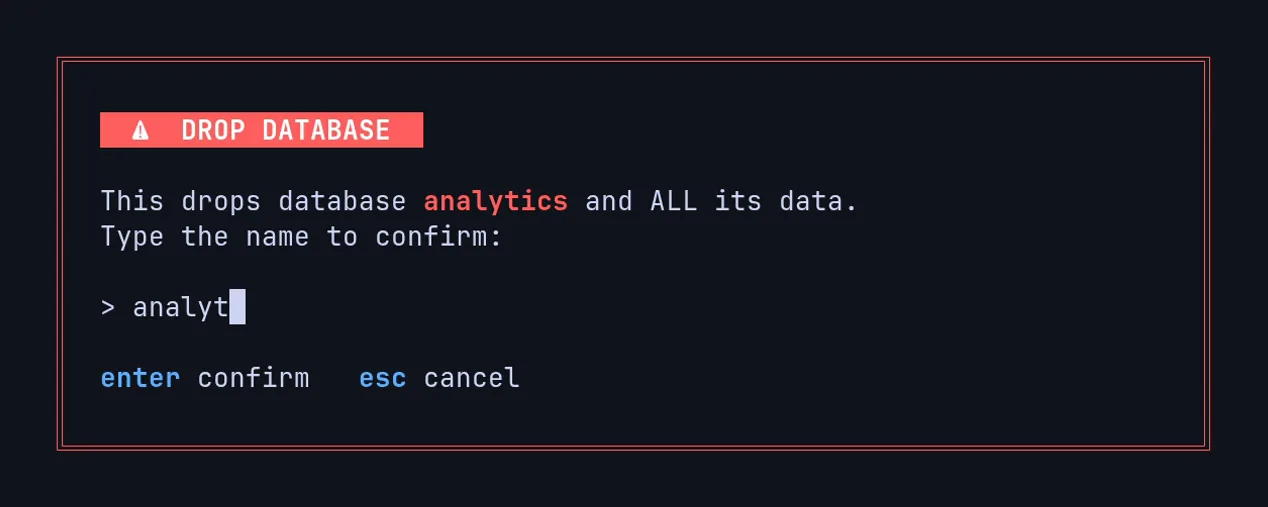
  • Dropping a database or role only proceeds after you type its exact name.
  • DROP TABLE, DROP DATABASE, TRUNCATE and unfiltered DELETE/UPDATE need a typed yes.
  • Force-drop reassigns ownership first — the data stays.
  • pg_hba.conf edits are backed up and rolled back if they would lock you out.
A 'Drop database' confirmation that only continues once the database name 'analytics' is typed in full.

Tuning

Tune with numbers, not folklore.

Tell pgtower how much RAM and how many CPUs the host has, and it compares shared_buffers, work_mem and friends with concrete targets — then lets you change them with ALTER SYSTEM, validated against type and bounds.

  • Restart-required settings are flagged before you apply them.
  • pg_hba rules with parse errors highlighted, editable in place.
Tuning advisor for a 16 GB, 8 CPU host: shared_buffers 1 GB against a 4 GB target, effective_cache_size, work_mem and maintenance_work_mem with recommended values.

Where it fits

Built to operate, not just to query.

Great tools already exist for writing SQL and watching activity. pgtower covers the admin work around them, across many servers.

ToolWhat it isMany serversRoles & grantspg_hba editorTuning advisorTyped confirmations
pgtowerAdmin TUI for operating clustersYesYesYesYesYes
psqlThe official SQL client—By hand, in SQL———
pgcliSQL client with autocompletion—By hand, in SQL———
pg_activitytop-like activity monitor—————
pgcenterStatistics and troubleshooting CLI—————

Our reading of each project's documented scope; check their docs for the details. They are good tools and pair well with pgtower.

Install

Running in under a minute.

The script picks the right binary for your OS and CPU, verifies its SHA-256 and installs it. Then run pgtower: the Servers screen opens, so press a to add a server, or l for the PostgreSQL on this machine.

Updates are offered inside the app, checksum-verified. Prefer not to pipe to a shell? Every binary and SHA256SUMS is on the releases page.

curl -fsSL https://pgtower.dev/install | sh
# pick your platform: linux|darwin × amd64|arm64
curl -fsSLO https://github.com/9LEVEL/pgtower/releases/download/v0.12.0/SHA256SUMS
curl -fsSLO https://github.com/9LEVEL/pgtower/releases/download/v0.12.0/pgtower-v0.12.0-linux-amd64
sha256sum --ignore-missing -c SHA256SUMS
install -m 0755 pgtower-v0.12.0-linux-amd64 /usr/local/bin/pgtower
# needs Go 1.26+
git clone https://github.com/9LEVEL/pgtower
cd pgtower
make install

FAQ

Questions DBAs ask first.

Anything else? Open an issue — it is read.

Does pgtower need superuser?

No. Dashboard, sessions, locks, databases, queries and roles work with ordinary privileges — CREATEROLE and CREATEDB to manage roles and databases, pg_monitor to see other sessions' queries. Only the Tuning tab's ALTER SYSTEM editor and its pg_hba section need a superuser.

Does it work over SSH?

Yes. It is a single static binary that runs in any terminal, so you use it inside your normal SSH session. Nothing to install on the database server, no web port to open.

Is it safe to point at production?

It is designed for it: a red PROD badge, confirmations for writes, a typed yes for destructive statements, the exact name to drop a role or database, and automatic rollback for pg_hba edits that would lock out the admin login. It is still an admin tool with real privileges — use a role with only the rights you need.

Which PostgreSQL versions does it support?

It is developed and tested against PostgreSQL 18 and relies on standard catalog views, so current supported versions are expected to work. If something does not, please open an issue.

Where are my servers and passwords stored?

In ~/.config/pgtower/config.yml, written with mode 0600. Passwords are optional there: leave them out and use ~/.pgpass, or point a server at an environment variable with password_env.

Is pgtower free?

Yes — open source under the MIT license, with prebuilt binaries for Linux and macOS on amd64 and arm64.

What happened to pgtui?

pgtui is now pgtower (v0.10.0) — another project already used the name. Same code, same keys, same config. Re-run the installer to switch: it renames the binary and leaves pgtui as a symlink. On first run pgtower moves the old config directories, and PGTUI_* variables still work as a fallback. Details.

Put your fleet under one tower.

curl -fsSL https://pgtower.dev/install | sh